
Read the evidence
For reviewers. How-to.
This guide shows how to read the fact panel on a case: ten fixed yes/no questions, the reading for each, and how the readings add up to a suggestion. The tool never writes to OpenStreetMap, and lanes only order the queue, so a reading never hides a case or acts on its own.
You need a case that has been analyzed. If its status is Queued or Analyzing, wait for it to finish. If it says Stale, a reviewer can choose Re-analyze.
Find the fact panel
Section titled “Find the fact panel”Open a case and scroll the right column to Fact panel. The table has five columns: Question, Reading, Probability, How it counts, and Cross-check against parsed evidence.
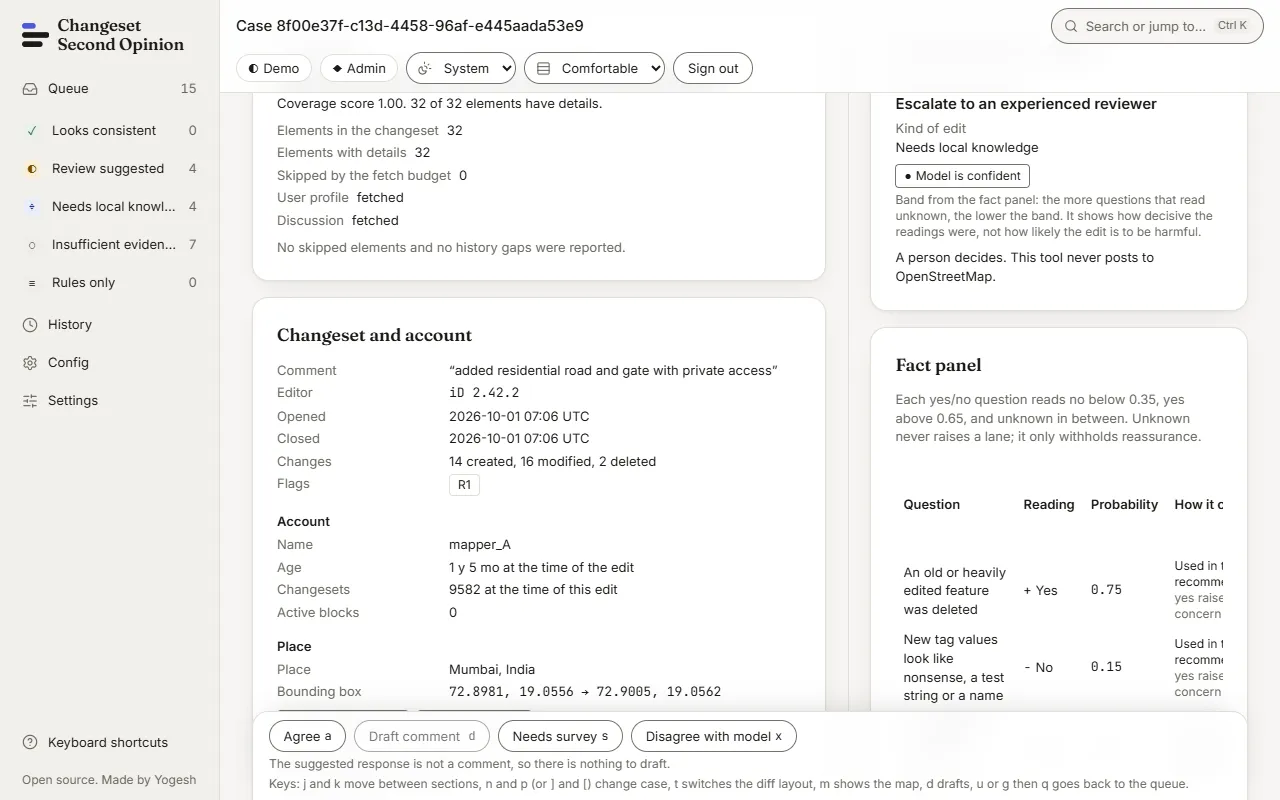
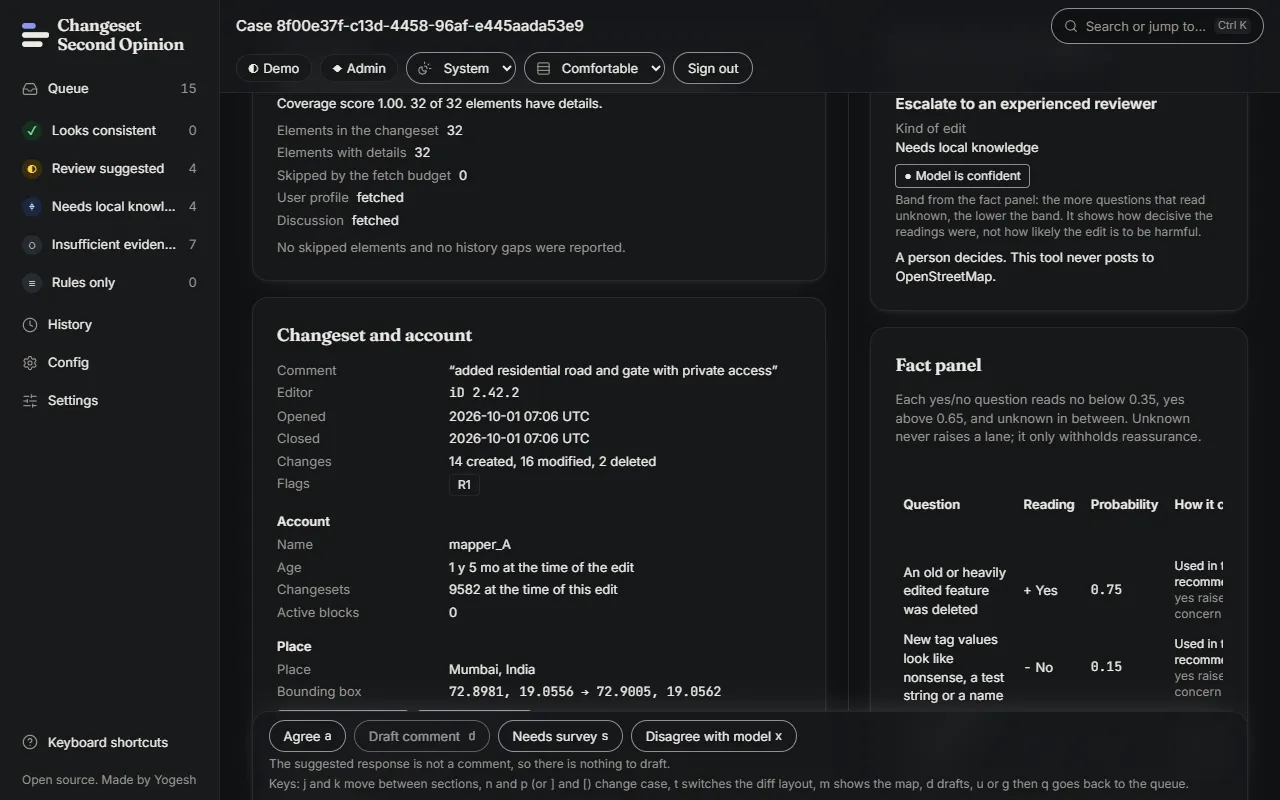
The text above the table gives the cut points in use, for example “Each yes/no question reads no below 0.35, yes above 0.65, and unknown in between.” Those values come from the active community pack, so they can differ between communities.
Read one row
Section titled “Read one row”- Reading is No, Unknown or Yes, with a sign:
−for no,?for unknown and+for yes. - Probability is the probability the model gave to yes. What is left over is one minus that number. With the default cut points, a probability of 0.75 reads as yes, and the remaining 0.25 is the share that is not yes.
- A probability between the two cut points reads as unknown. Unknown is the cautious reading. It withholds reassurance, and it never raises a lane by itself.
- How it counts says whether the answer was used in the recommendation, was a cross-check only, or was stored for audit only. It also says whether a yes raises concern or reassures.
- Cross-check against parsed evidence compares the model’s reading with a value the code worked out from parsed facts. The result is Agrees, Disagrees, Undecided, Not applicable or No cross-check. A Disagrees is a good reason to read the evidence yourself.
The model’s answers are never shown as a single score. The band above the table, such as Model is confident, says how decisive the readings were. It does not say how likely the edit is to be harmful.
The ten questions
Section titled “The ten questions”The question text is a constant. The same words are shown to the model and to people who label examples.
| Question as shown | Where the answer comes from | A yes means |
|---|---|---|
| An old or heavily edited feature was deleted | The age and earlier versions of each deleted element | Concern |
| New tag values look like nonsense, a test string or a name | The new tag values in the tag changes | Concern |
| The changeset comment matches the edits | The mapper’s comment and the kinds of edits listed | Reassurance |
| New or changed tags follow ordinary OSM conventions | The new and changed tags, by feature type | Reassurance |
| The account is new or has very few changesets | The account’s age and changeset count at the time of the edit | Concern |
| Deleted elements were added by the same account recently | Who created each deleted element, and when | Concern |
| The edits claim a real-world change that tags cannot confirm | The tag changes and the history | Concern |
| The discussion names a survey, imagery or other source | The discussion on the changeset | Reassurance |
| One tag key was changed on more than 20 elements | The tag changes across elements | Concern |
| The evidence covers all deletions and most modified elements | The coverage block | Reassurance |
The model is asked the question in a longer form, such as “True if any deleted element in the evidence has age over 365 days or more than 5 prior versions.” The shorter form above is the label the app shows.
The last question is a cross-check only. A rule, R3, already decides from coverage whether there is enough evidence, so the model’s answer is stored and compared but does not feed the suggestion.
See how the readings become a suggestion
Section titled “See how the readings become a suggestion”Below the fact panel, How the recommendation was composed lists which rows of a fixed table applied. Examples of what the rows say:
- Escalate to an experienced reviewer: a nonsense value, the mature deletion rule, or at least two concern questions read yes.
- Ask for a local check: the edits claim a real-world change and the discussion cites a source.
- Ask for the source: the edits claim a real-world change, or nothing else applied.
- Welcome and tips: the account is new, or the tags or the comment do not look right.
- No action suggested: every question the table reads is decisive and reassuring.
Rules that fired lists the rules that read parsed evidence directly. For example, R1 fires when a feature older than a year, or with five or more earlier versions, was deleted. R3 fires when too little of the changeset could be fetched. Each rule has a severity (Information, Warning or Blocks reassurance) and a note on what triggered it.
The kind of edit that the model also guesses is stored and shown as advisory. It does not change the response, the band or the lane. For the full reasoning, see how a verdict is made.
Check that it worked
Section titled “Check that it worked”Pick one row and test it against the evidence in the left column. For “The account is new or has very few changesets”, read the Account block: it gives the age and the changeset count at the time of the edit. If the row and the block disagree, trust the block and say so in a note when you record your decision.
To share what you found, choose Copy receipt link (or press l). Next, learn to read the shareable page in read a receipt.
Map data © OpenStreetMap contributors, under the Open Database Licence. Code under the Apache-2.0 licence. Made by Yogesh.
Changeset Second Opinion is an independent open source tool for OpenStreetMap reviewers. It is not endorsed by, sponsored by or affiliated with the OpenStreetMap Foundation. OpenStreetMap is a trademark of the OpenStreetMap Foundation, used under itstrademark policy.