
Draft and send a comment
For reviewers. How-to.
This guide shows how to get a first draft of a comment to a mapper, make it your own, and send it. The tool writes a draft only when you ask for one. It never writes to OpenStreetMap. You paste the comment on the changeset page yourself.
You need to be signed in as a reviewer, and a case that has been analyzed and is not stale. Viewers can read the latest draft but cannot request one. If the case says it changed since the last analysis, choose Re-analyze first.
Check that the case has something to draft
Section titled “Check that the case has something to draft”Look at the action bar at the bottom of the case. If Draft comment is available, the suggested response is a comment: welcome and tips, ask for the source, or request a local check.
Some suggested responses have nothing to draft. “Escalate to an experienced reviewer” and “No action suggested” are not comments. On those cases the button is greyed out and the text says “The suggested response is not a comment, so there is nothing to draft.” Record your decision instead. See record and correct an outcome.
Ask for a draft
Section titled “Ask for a draft”- Choose Draft comment, or press
d. - Under Choose the kind of comment, the recommended kind is marked. You can pick another kind that the case allows.
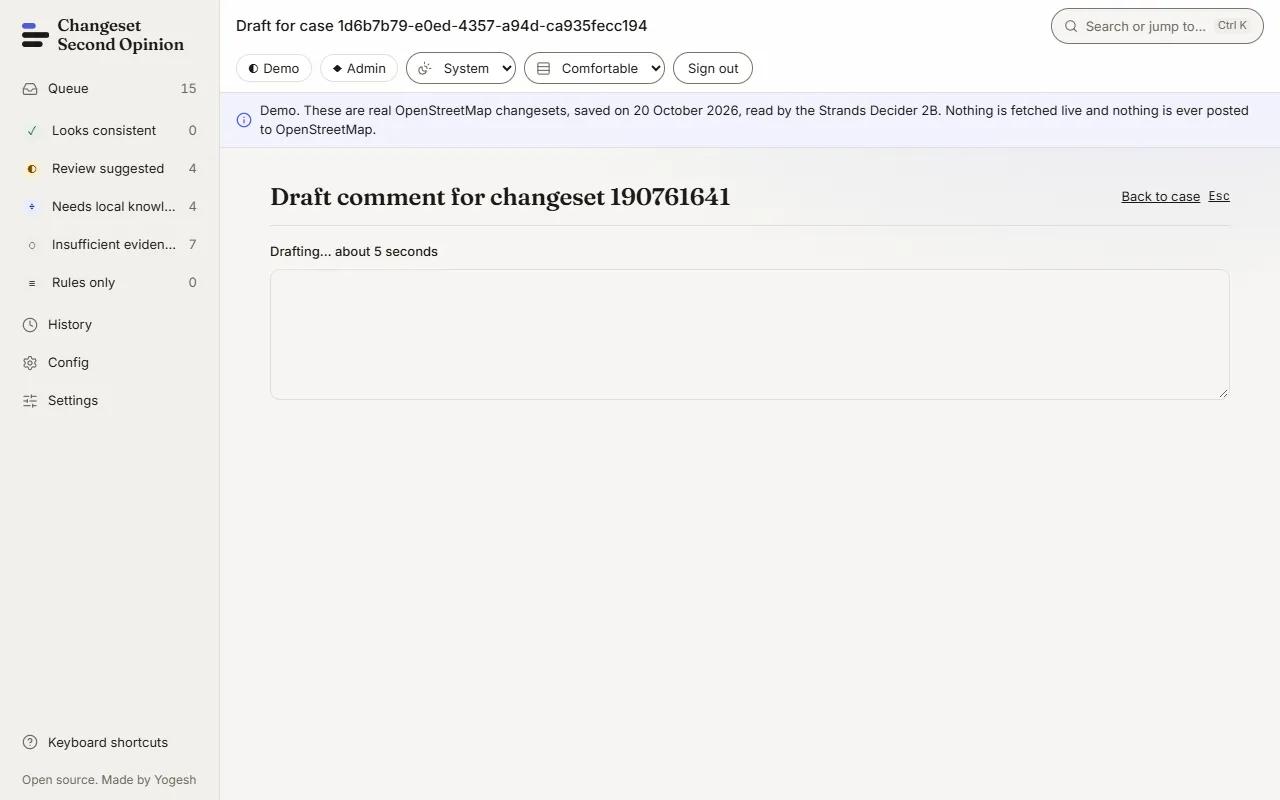
- Choose Write a draft. The page says “Drafting… about 5 seconds”.
Which writer produces the text is shown on a badge:
- Model draft. Written by Claude Haiku 4.5 through Amazon Bedrock. This only happens on a server where Bedrock is switched on.
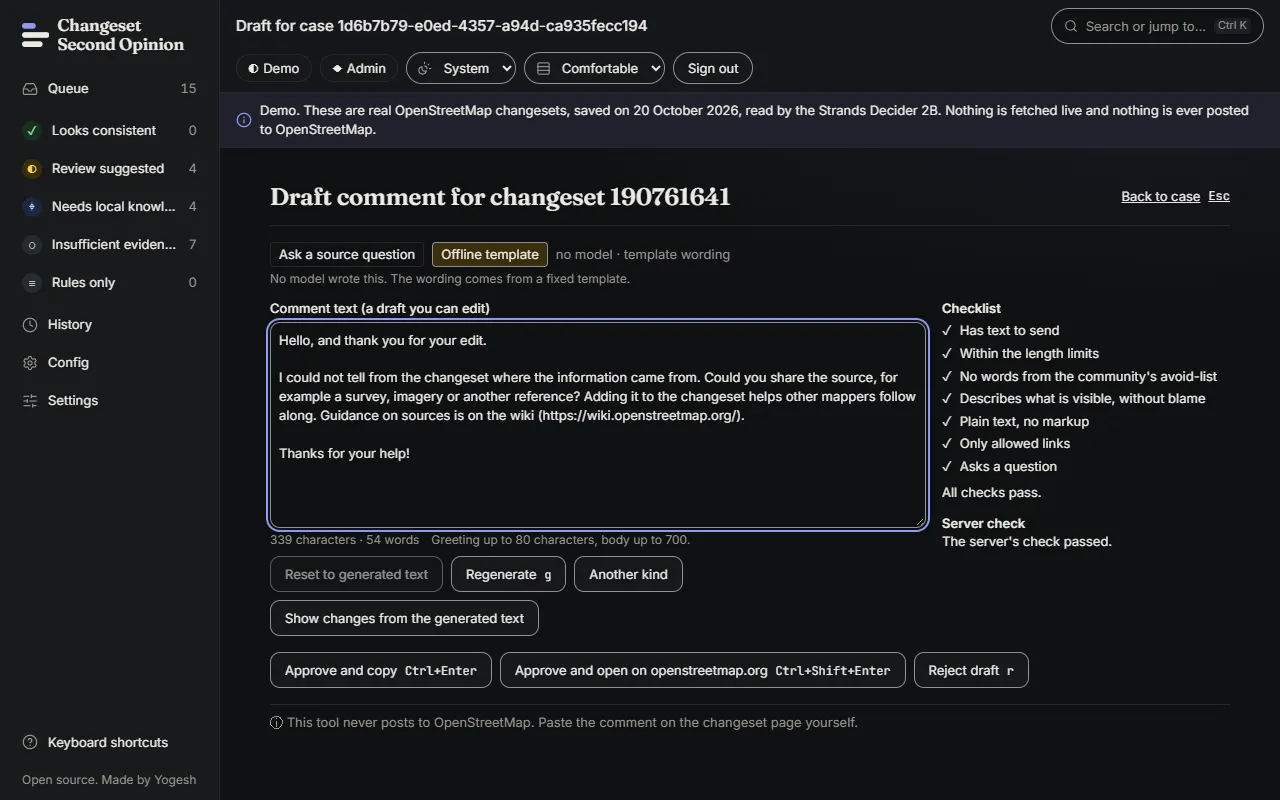
- Offline template. No model wrote it. The wording comes from a fixed template. The demo and any server without Bedrock work this way.
- Written by hand. You wrote it, because no draft was made or you chose to start from nothing.
If a draft does not pass the server’s checks, no draft is kept and the page says so. You can write the comment yourself in the text area.
Edit the draft
Section titled “Edit the draft”The text is a plain-text draft that you can change freely. Under it you see:
- Checklist. The draft is tested for: has text to send, asks a question, describes what is visible without blame, written in the community’s language, within the length limits, only allowed links, plain text with no markup, and no words from the community’s avoid-list. Each item is marked Met or Not met, with the line that failed.
- Server check. The server runs the same kind of check and reports its result.
- Cites. The evidence lines the draft refers to, so you can check each claim.
- Your changes, word by word. Choose Show changes from the generated text to see what you edited.
You can also choose Regenerate once for a new draft, or Reset to generated text to undo your edits.
Send it
Section titled “Send it”When the checklist says “All checks pass.”:
- Choose Approve and copy (or press
CtrlandEnter). The text is copied to your clipboard and your decision is recorded. - Or choose Approve and open on openstreetmap.org (or press
Ctrl,ShiftandEnter). This copies the text and opens the changeset in a new tab. - On the changeset page, paste the comment and post it yourself.
If the copy fails, the decision is still recorded and the text is shown so you can select it and copy it yourself.
If the draft is not right, choose Reject draft, pick a reason (No comment needed, Wrong tone or Wrong facts) and choose Record rejection. Nothing is copied.
Check that it worked
Section titled “Check that it worked”The page shows Decision recorded and the final text. Open History and you see the decision with your final text and a word-by-word comparison with the draft. On openstreetmap.org, the comment appears only after you post it.
Keys on this page: g regenerates, r opens the rejection form, and Escape goes back to the case.
Next, see how decisions are stored and fixed in record and correct an outcome.
Map data © OpenStreetMap contributors, under the Open Database Licence. Code under the Apache-2.0 licence. Made by Yogesh.
Changeset Second Opinion is an independent open source tool for OpenStreetMap reviewers. It is not endorsed by, sponsored by or affiliated with the OpenStreetMap Foundation. OpenStreetMap is a trademark of the OpenStreetMap Foundation, used under itstrademark policy.